Skip to content

Generated Prompt

No prompt generated yet

Upload an image and click Create Prompt Draft to create an editable starting point.

AI Image to Prompt

Image to Prompt Examples

Reference image and prompt recipes from Zanta. These written descriptions are not output from this tool.

Source image
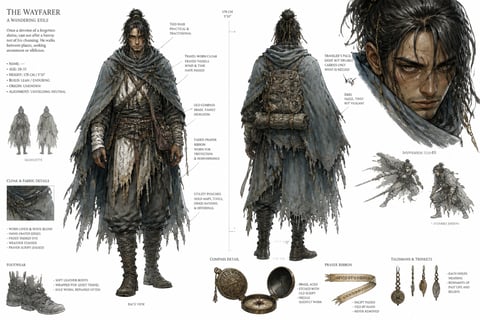
Wanderer Design Board
Fantasy wanderer character concept sheet with sketches and callouts
Reference example prompt

Wanderer Design Board

Ultra detailed character design concept sheet on clean white background watercolor and ink wash lean wandering exile faded gray blue cloak frayed tassel edges dark gold tied hair hazel tired vigilant eyes old brass compass on pack faded prayer ribbon on wrist front side back sketches detail callouts small english labels measurement notes arrows dark fantasy costume design dynamic aggressive close up no logo no watermark.

Source image
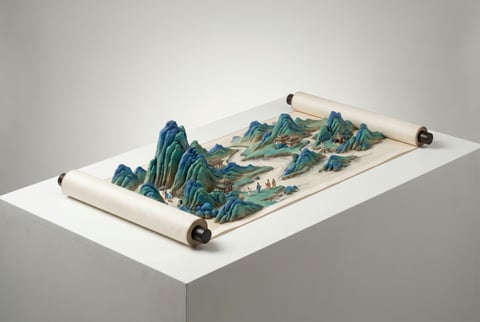
Landscape Scroll Relief
Three-dimensional blue green landscape scroll relief
Reference example prompt

Landscape Scroll Relief

Surreal contemporary artwork inspired by a classical blue green Chinese landscape scroll. Paint mineral pigment mountains rivers pavilions and tiny ancient travelers onto a partially unrolled three dimensional scroll. The landscape rises from the scroll as a delicate 3D relief with layered peaks river valleys and miniature architecture. Clean pure white background, soft studio lighting, refined blue green mineral texture, traditional fine line painting fused with modern 3D rendering, extremely crisp detail, premium art object, no text, no logo, no watermark.

Source image
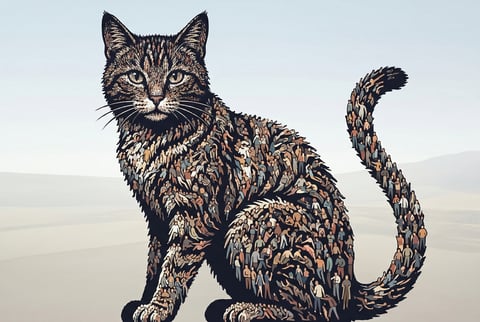
Fractal Crowd Cat
Graphic cat silhouette made from dense fractal-like tiny figures
Reference example prompt

Fractal Crowd Cat

A vast crowd of tiny stylized people in different poses, body shapes, and sizes collectively forms the silhouette of a giant cat. The arrangement is inspired by fractals and emergent patterns. Clusters of people bend stretch and flow to create the cat ears back tail paws and facial features. Wide composition, clean readable silhouette, high detail crowd pattern, elegant graphic surrealism, no text, no logo, no watermark.

Source image
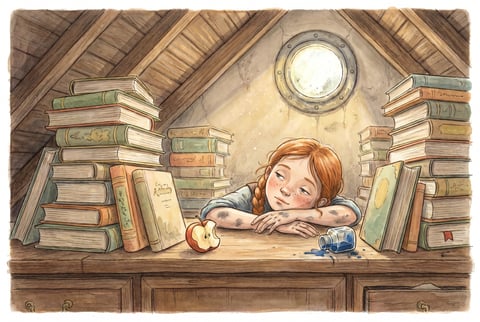
Attic Library Afternoon
Storybook attic library scene with a girl at an old desk
Reference example prompt

Attic Library Afternoon

A small girl with copper braids and paint stained fingers lies on her stomach across an enormous old library desk in a dusty attic room, chin resting on her folded arms, eyes dreamily half closed as golden afternoon light streams through a round porthole window above her. Towering stacks of illustrated books surround her like a paper fortress, their spines faded to muted sage rust and cream. A half eaten apple and an overturned ink bottle with dried blue rivulets mark her afternoon work. Wide storybook illustration, no text, no logo, no watermark.

AI Image to Prompt Use Cases

Editable visual briefs for creators, marketers, founders, designers, and prompt writers using an existing image.

Product marketers

Capture layout, palette, contrast, and lighting as a reusable brief.

Campaign creators

Turn visible art direction into editable prompt language.

Design teams

Create a quick starting outline from a mood board or layout.

Prompt writers

Build a structured first pass before adding semantic detail.

HOW IT WORKS

How to Use Image to Prompt

Upload one image, confirm permissions, and create an AI description. Review the draft before reusing it.

Fantasy wanderer character concept sheet with sketches and callouts
Reference illustration; review your own AI result separately.
1

Upload one source image

Choose the product, campaign, character, layout, or source image that should guide your next brief.

2

Create the prompt draft

Review the AI description of the visible subject, setting, composition, colors and lighting. Correct inaccurate details.

3

Review and reuse

Edit the composition, style, camera intent, and required constraints before sending the draft to AI Image.

Get Started

AI Image to Prompt FAQ

Questions about editable image-to-prompt drafts, source review, visual cues, accuracy limits, and related tools.

Does this tool identify the exact subject?

The model describes visible subjects and visual details, but can be wrong. Verify text and factual details yourself; it does not establish a person’s identity.

Is the generated prompt editable?

Yes. The result is an editable draft that can be copied or sent to the AI Image studio.

Does it create a new image?

No. It creates text only. Use the image studio when you are ready to generate a new visual.

Is the source image uploaded?

Yes. With your permission, the source is sent to Nano Banana Pro through our AI provider for visual description. The normal cost is 40 credits per successful request.

Which image formats and sizes are supported?

Use a JPEG, PNG, or WebP file no larger than 10 MB. Decoded images are limited to 16 million pixels and 8192 pixels per edge.

Which visual cues does the draft use?

The model interprets the visible subject, setting, composition, lighting and style. Review its interpretation against the source.

Why do the reference prompts describe subjects?

The illustrated prompts are written reference recipes from Zanta, separate from the AI description produced for your upload.

Can I use the draft in AI Image?

Yes. Review and edit it, then choose Use in AI Image. A new image is generated only after you separately submit it in that studio.

Will my prompt survive a refresh?

No. Copy the text before refreshing or leaving this tool. Choosing another source also clears the previous draft.

Start with AI Image to Prompt

Upload one image, create a prompt draft, and edit the text for your next creative brief.